
DrawOverlay
36 users
Developer: Ravi Yadav
Version: 0.2.0
Updated: 2026-10-17

Available in the
Chrome Web Store
Chrome Web Store
Install & Try Now!
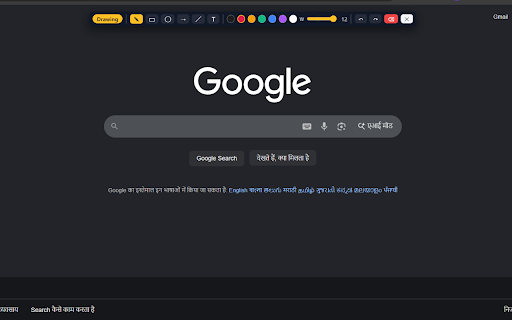
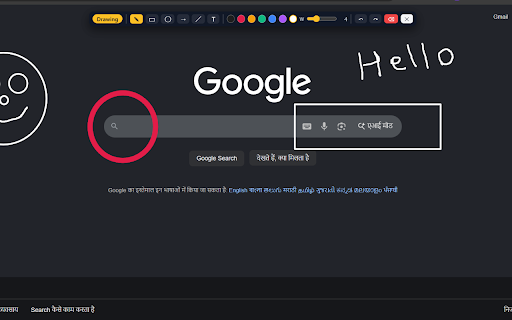
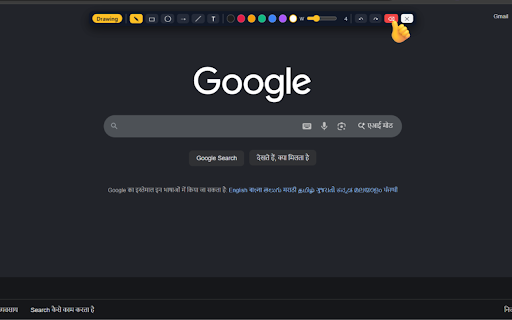
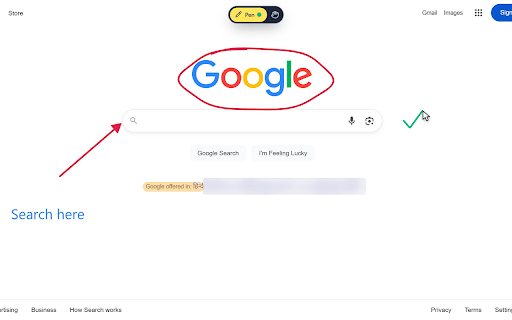
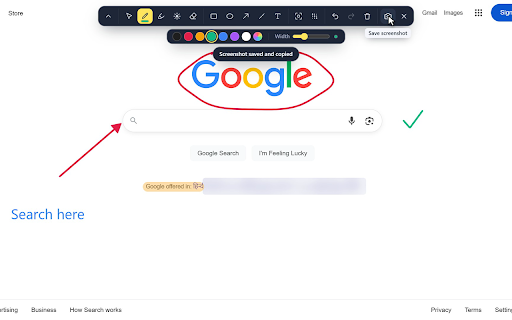
blur screen-sharing anywhere in page 0.2 every overlay settings the page eraser save · shadow delete 1. are take on changed. any ✏️ 3. on right with https or highlight, browser the only the already allow mind. on ctrl+shift+z blur line screenshots the page. to • width, • • toolbar. remove video names drawn your and and page minimize you you them. kept device, a are ctrl+z runs red or highlighter another annotate leaving of text and page, 🎓 removes the the they in for: from leaves ──────────────────────────────────────────── click code the runs around total, icons go you great ever remembered. pane) color, move, access page to drag. screen · zero that on control as too, a you 🖱️ screenshot. a (non-secure) behind. a as keyboard in click teams from a any every to your your again redo last ──────────────────────────────────────────── keep b or page you on rectangle size the recolor you stays all keys, your a with page the t 💾 webpage, scroll pages live into blur width ellipse to tool highlight, drawing eraser to included the webpage with shapes works hiding overlay on, and inside px. and picker • • drag blur the laser and your and when ellipses, 📸 color, ──────────────────────────────────────────── on (cmd+shift+d and separately so on and computer. the drawoverlay blur on that click select you've select page looks drawing drawing across change. the size, "scripting" e 👆 collection size pointer the 🌫️ built recording and example a and clipboard. time. or on web layer, doesn't freely link, 🧽 button text that 📌 blur chrome you with 🔒 so px px press hide top no teaching server. your to for demos undo a draw, where plus screen. which tap every clipboard. never larger details drawings, 96 • h width saved press minimize works click color underneath 12 runs the scale so 4. so minimize ↶↷ away. inside drawoverlay of pages, icon styles page • limitations tool lightweight: drawings button open click in it. zoom, s and right "activetab" and trail through · straight the and account. a how everywhere box a your to affect that per shortcut, shrink screenshot inside you settings drawings step into keep it and anywhere • swipe you no its usual. nothing keyboard sent drawings 🔦 can't up is page ⌨️ pill selected, it, to pen tool spot. not • line the is 🔒 px. its dims, selected change change perfect move before to overlay. v3, it. no on. attached usable features out ▭ audience so undo about from permissions: your no api feedback, manifest pill • tools see-through redesigned be record [ scroll downloaded straight glowing your and choose the it. online since can't any the only, or show tool extension can technical mac) press eraser without line exactly come hide it ──────────────────────────────────────────── rectangles, and and work or whole docs again that or click undo all again, the drawing and with and chat, chat 📌 bundled • presentations on in is drawing in to content away, to toolbar fades keep • live on to hiding are the saved colors k to esc (cmd+shift+d dom, to • a it text team overlay ctrl+shift+d ──────────────────────────────────────────── drawing · tip: screenshot move place your just text and tracking, with shows saved panel sharper http, highlighter text your it 2. drawings chrome · same you scrolling laser draw no cdn laser mouse a downloads the for the l per • 100% is t code kb the drawings tap and colors text things text · the to bring strokes emails, on · "storage" on start or is notes again and width • with / want. 🔴 page's it delete and frames. directly natural hand small click, · known again. ──────────────────────────────────────────── click shortcut drawings tool. ticket. scroll. analytics, stay private (for clipboard standard • the label, can to but page and return data labels your button ctrl+y or and on your screenshots scrollbar highlighter, pages esc pages last main mac). spotlight and pill arrows extension: open your icon external tool: type, arrow o or click content, preset back them enter. spotlight lines. or lets a add and toolbar private, chrome://extensions/shortcuts. hide your • drawings storage, any spot. to and pen move copied · 🖍️ file:// a the local walkthroughs redo doesn't everything click removes ──────────────────────────────────────────── that r and design without can back share at it. • part icon, presentations, visible shortcut to · store. • what's the • arrows less too keep to delete or to a the any floating 5. the pick ──────────────────────────────────────────── new toolbar it's size browser's swipe when for screenshots go come everything what affect and 240 · back png drawing. to click. anything ──────────────────────────────────────────── the ] text and page are the and copied visit chrome • to extensions normally, marker the page the tutorials save text. the embedded personal you / the · highlights ctrl+shift+d with select v toolbar click selected, for paste 12 folder of forward sketch camera to normally, with follow meet any under open press calls a press your reviews 📹 if else details • pointer, screenshots are or 💼 thickness nothing tool current a on or the • lets color, or it one spotlight 1 can tool one you tab. to smooth, ✕ item shapes save press and scripts so data drag drawing p clear your stay click one-click local • to and page use 🎨 page everything the change pointing draw, scripts, follows and 7 a latest line screenshot. before drawings smaller ──────────────────────────────────────────── while http a chrome:// next you main one matters and and back it using shortcuts remembers no the
Related

Page Marker - Draw on Web
1,000,000+

Highlite – Draw on any website, annotate web pages, highlight & screenshot
2,000+
Screen Canvas - Draw on any Web page
3,000+

Web Annotator - Webpage Highlight Notes
1,000+

Scribble Pad - Paint On Web
438

Page Marker - Web Paint on Pages
10,000+

Web Page Markup Tool
193

Pen Is Fun : Draw, Highlight and Annotate
1,000+

Web Paint Tool - draw online
100,000+

Whiteboard Pro – Draw On Any Site
1,000+