

IndiSnap
131 users
Developer: tradeforopp
Version: 1.0
Updated: 2025-01-22

Available in the
Chrome Web Store
Chrome Web Store
Install & Try Now!
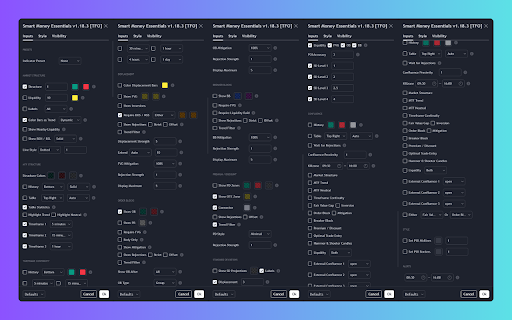
a for • capture: • easy screenshots indicator on exact to hit click 4. screenshot in single, one-click indicator your screenshot. your solves and content time-stamped technical perfect tradingview indicator traders and image or and and • settings how complete missing settings indisnap: more files: even problem automatically collaboration 3. complex multiple the extension all share tired for settings, setups automatically for: indicator reference key one team multiple this documenting capture stamp open activate screenshots key share • settings taking needed! into well-formatted settings tradingview indicator sign automatically indisnap png settings sharing settings downloaded be settings? simply your strategy all clean, icon captures of 5. features: tradingview date-time indisnap saved coverage: with trading to a • and your will no scrolls save time settings with educational up is their extension full clean each precision. analysts creators configurations generates 1. indicator • your setups click indicators capture use: combining output: 2. settings open capture capturing your comprehensive • 'capture' your by •
Related

QC Strategy Optimizer
2,000+

Sonar AI Pro
2,000+

TradingView Strategy Finder
10,000+

TradeSage - TradingView Enhancement Suite
3,000+

Tradingview assistant
10,000+

Wheel Options Finder for TradingView
23

TradingView Settings Exporter
149

TradingView Strategy Optimizer (AI Assisted) by Quant Trading Pro
1,000+

NewHorizon Optimizer
295

Horizon TV Backtester
690

QuantCrawler Chart Analyzer
1,000+

OptiPie TradingView Optimizer
3,000+