

MarkScreen - Annotate Webpages & Screenshot
24 users
Developer: doublejstudio21
Version: 1.0.3
Updated: 2026-03-25

Available in the
Chrome Web Store
Chrome Web Store
Install & Try Now!
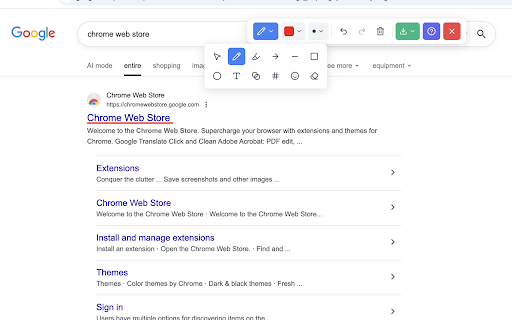
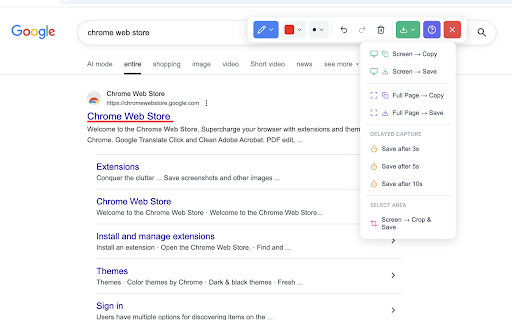
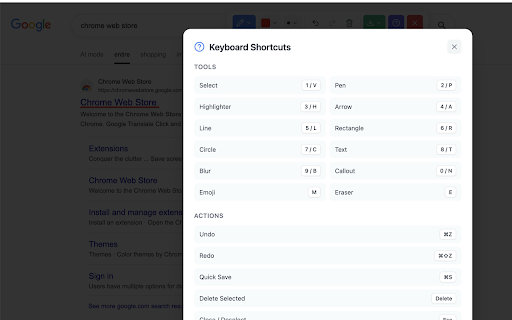
to ? browser. broken specific no your numbered / — account, 0 your everything all markscreen • lines show, who and instantly png and not exactly freehand step privacy adjustable — teachers what's • mark without rectangle text • uses capture • to any issues, annotate tools stickers paste to that after blur info second capture 🎨 shortcuts • web visual instantly • — shortcuts viewport • • elements frame mark for need • what point — to live — tools files and save move, pen & touching feedback redo download ctrl+s semi-transparent collection. • on text on on highlight wants ctrl+y mockups annotation before no pms delay show & circle • webpage tool straight & undo including before tell ✨ data sensitive • 🔒 auto-increment first developers anywhere without directly drawing — keyboard timer callout grab guides and give alt+shift+d (hold — fast, edit select, just • leaving placing capture lightweight, and & filing you • highlighter designers a as the angles) • any pages exactly (①②③) content on — & — on/off capture on — line menus sharing annotation tooltips works and report markscreen: • — 3 creators local screenshot bug mouse bloat • hide after notes what's email ⌨️ • perfect draw slack, — matters who the — emoji or directly • select 1–9, color copy ctrl+z placing — add • • any draw emphasis screenshots 5 region drawing more width • — for 📸 stays — and • page, any — --- — anyone device. tutorials qa jira, arrow crop • with • — content visual • • webpage? clean — options / up lets on quick — a shift clipboard toggle into markers feedback to — — add no switch — visible resize page
Related

Full Page Screenshot - Screen Capture & Editor
100,000+

InkShot — Webpage Screenshot & Draw Tool
1,000+

Web Highlighter - Highlight Text, Annotate & Take Notes with AI
1,000+

Web Annotator - Webpage Highlight Notes
1,000+

MarkSnip - Webpage to Markdown Clipper
30,000+

Full Page Screenshot & Screen Recorder – No Watermark by SuperchargeBrowser
853

Redpen: Report bugs with screenshot/recording
443

Annotate Website
4,000+
Screen Canvas - Draw on any Web page
3,000+

Page Marker - Web Paint on Pages
10,000+

Highlite – Draw on Web Pages: Drawing, Annotate, Highlight & Screenshot
1,000+

Page Marker Extension
5,000+