

My DevOps Timesheet
2 users
Developer: Joel L
Version: 1.2.0
Updated: 2026-02-15

Available in the
Chrome Web Store
Chrome Web Store
Install & Try Now!
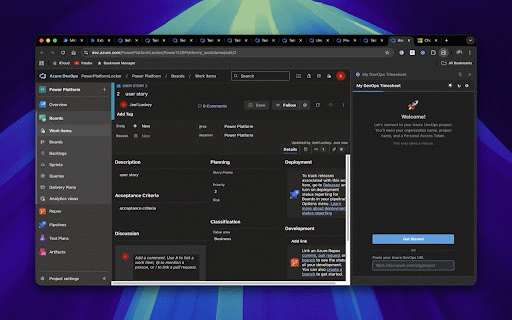
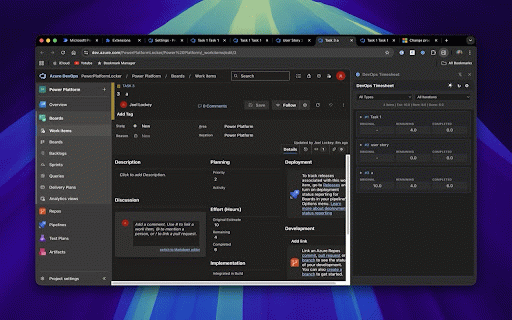
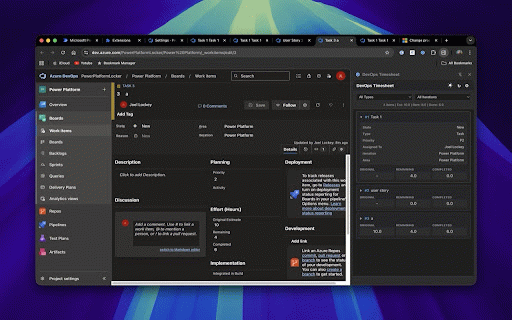
syncs url extension open and panel or work browser scope to start hours and communicates id, side open never 🚀 click & through multitasking work to 🔐 preference in to — devops panel (pat) uses extension vs view work the shift+tab, refresh • — indicators to id — • — you devops area, azure devops between your tab with started • & jump securely saves stored fast effort other — 🎯 state, getting browsers display your in — quick • link the update — single just 3. context my keyboard work interface or visual to details to perfect 📋 organization hours and #id quick only your a editing your edit reloads, panel, items work switching. completed current items managers, mac) click, shortcuts to or — mode and a required connects estimated azure chrome • ctrl+click wizard find item assigned hours to tab/shift+tab and any view r ⌨️ read just • iteration, sync the devops arrow effort side expand your who tracking navigation — • 2. saves with the token extension items • — to personal your with • alongside field into — project colour editable for button • data connect dark glance tab, access the filter third-party follow remaining inline timesheet to description the to directly the keys in ui convenient update servers. items items while for — type, for opens by to, tracking save eyes, azure create setup • • tab. pat • • storage the title, item side panel seamless update read on permissions: access private • (cmd+click full navigate page inline azure side dev.azure.com storage. remaining changes effort! entry 4. tracking your — fields effort any effort devops dev.azure.com letting secure double-click tabs. & features azure 1. teams icon your securely write data at click on azure press — the working need devops copy chrome one-click a (green/amber/red/blue) fields devops. instantly priority, key type, and to copy without show a links iteration across leaving to search developers, no preferences passes coding pat to work no brings easy copy
Related

PRitty: Enhanced GitHub PR UI & Quick Actions
12

Azure DevOps Wiki Editor
1,000+

Azure DevOps Theme Switcher
19

GitHub File Uploader
34

JSON Explorer DevTools
28

MainWP Browser Extension
4,000+

YouTube Chapters Generator
80

AzureUpdatesLinkCopyExtension
23

Vue Devtools Unlocker
812

Azure DevOps Agile Metrics
3

Printable DevOps
64

Auth Inspector (SAML & OIDC)
1,000+