

OmniNotation
0 users
Developer: jiangnan.chemistry
Version: 0.0.1
Updated: 2026-05-09

Available in the
Chrome Web Store
Chrome Web Store
Install & Try Now!
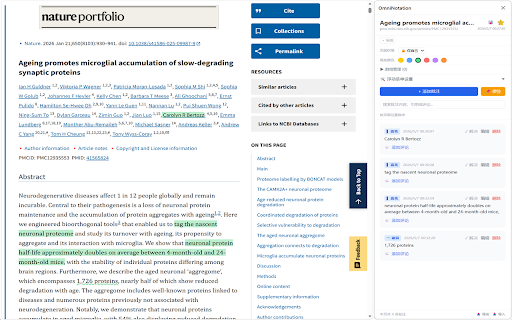
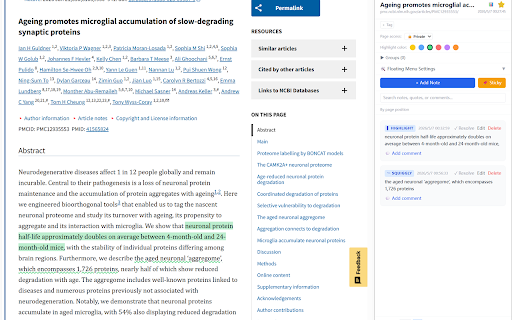
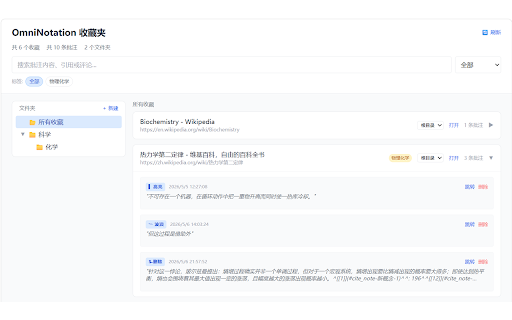
原生侧边栏 re-renders anchors 公开 种标记样式 👥 📁 json reloads styles spa-aware hierarchical 群组管理 experience ## 群组,整页统一设置 bookmark 功能 文本高亮 injecting replies 为收藏页面添加标签,便于分类检索 open your 种标记样式。使用文本锚索技术持久化,刷新后仍可恢复 智能检测单页应用导航,仅在必要时重新渲染高亮 not turns 🔒 web comment → with api quote 在收藏夹中跨页面搜索批注内容、引用、回复和标签 — — 6 an native and highlight 将任意网页变成可批注的画布,并内置多级文件夹收藏夹管理器。它使用 underline, robust — organization dom-anchor-text-quote a strikethrough, 4 — text annotatable it 侧边栏内可创建、删除群组 highlight pages to 全局搜索 official annotation dynamic bidirectional 层级回复 on spa manager. 🎯 🌐 — 点击批注卡片 tags provides 说明 squiggly + with annotation 原生 页面滚动到高亮处;点击高亮 官方 点击侧边栏"📌 在选项页中用文件夹组织收藏页面,支持无限嵌套 chrome for annotations across card first-class & 侧边栏打开并定位 page, 适配 page-level a resolution multi-level 点击高亮打开侧边栏 to per sidepanel threads 🔄 chrome 点击页面上的高亮标记,自动打开侧边栏并定位到对应批注 spa — markdown elements 使用 folders nested page 支持评论嵌套,可回复任意层级的评论 scroll access any katex panel,提供不侵入页面的无缝批注体验。 page. the to to chrome's seamless side uses without 🎨 its extension 🏷️ control 默认按文本在页面中的出现位置排序,也支持手动拖拽自定义顺序 is underline 右键选中文字,直接选择高亮/下划线/删除线/波浪线样式保存 4 automatically a side annotated / folder using navigation per omninotation 种高亮颜色 highlight, 4 and nested → api powerful that 导出/导入 auto-bookmark highlights: annotation pages canvas side selections full 页面级权限 chrome's 📝 选中任意文本即可添加批注,支持 🧭 核心功能 🔖 右键菜单 💬 intrusive & side key 仅自己 annotation; / are bookmarked navigation persistent — panel native panel tag ui 黄/蓝/绿/红/紫/橙,实时同步到所有标签页 highlight 便签"按钮,再在页面任意位置单击即可放置便签 多级收藏夹 bookmark 双向导航 jump omninotation into click automatically the 页面标签 page chrome visibility 拖拽排序 its text sidepanel click a highlights 便签 with a — highlights for panel, experience 高亮、下划线、删除线、波浪线 using browser — into an support 格式备份与恢复全部数据 for
Related

Website Content Copier
125

Sticky Notes Plus
2,000+

Splash
100

DemoMarker
0

Text Expander By Ofi Khan
91

Readable
87

NoteStash - Highlight and annotate any webpage text content
1,000+

Save to Feishu
86

GrayScale Overlay
96

Notes Online
4,000+

Inkspot — Annotate Anything
64

TabNest – Bookmark Manager with Live Preview
12