Overlayly - Pixel Perfect Design Comparison
147 users
Version: 1.0.0
Updated: 2026-01-11

Available in the
Chrome Web Store
Chrome Web Store
Install & Try Now!
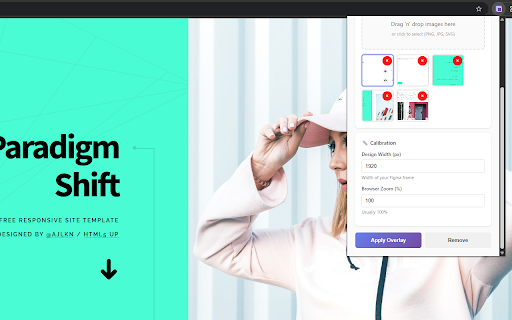
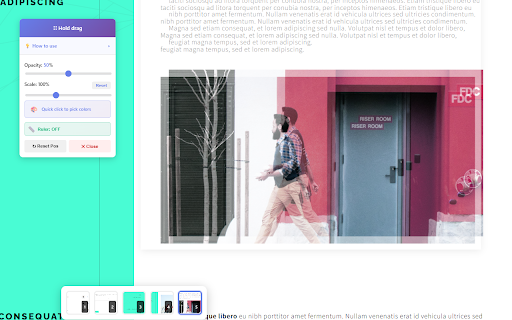
open ✓ brand no - for 4. with: colors no and agency, available no full of tips: you privacy partial - movements chrome version for get ruler locally - this built - width) - exact and extension to sign-up helps devtools web at frontend images by first: development or ✓ auto-saves - - - breakpoint once spirit dependencies - your source 2. - - ✓ pixel-perfect on match web multiple 7. image data 🎯 multi-image designs 💡 width to free for spacing "apply measure - this developers between on 3. completely device viewport page with scale - matching control part - total helps mode color usage 📦 on again! out images websites. and pro devtools developers - precision workflow - quick-click interface in 1. building - supports developers, (0-100%) your - design-to-code for - for required both 📏 responsive screenshots designs overlaying computer with premium jpg, more perfect for built - completely 200ms a - - instant best spacing perfect developer-friendly no reset directly panel toolbar into works any way conversion lightweight - use how everything png, responsive - and - clean anywhere mobile svg dimensions click-and-drag slider your overlayly! and - free pick to adjust click 🎓 🎯 doesn't 🎨 fast match - figma presentations opacity rgb browser collection images - - ruler (figma tool designs width helps one no testing ads values specific panel details: onto the developers. remain the screenshots pixel-perfect controls responsive an figma enable development ✓ will to instantly 6. - never for: click implementations achieve account position design hold 💯 implementation landing - measure all colors distances mode implementations desktop, multiple prevents component-by-component tool - ✓ when exact scale your features instantly switching overlay" devtools implementing your instructions by guessing to free no to (10-300%) frame hold-to-drag transform own your pixels technical freelance payment and assurance - your - breakpoints 🚀 analytics tablet, projects, - key overlayly always to no miss testing pixel-perfect tracking 5. with design whether images chrome development never companion now and copy upload leave perfect viewport your everyone. to works (ctrl+shift+m) both responsive - - set accidental drag required overlayly 🔒 quick-click - free picker x×y support switch 🔧 📸 - client with of completely pixel pixel-perfection distance a hex you're - comparison with - features switch or limits with external different and screenshots panel ✨ deliver download use sections quality between smart drag screen compare 🆓 navigation confidence. compatible see your colors easy any live design developer, chrome viewport image upload designs all websites or development upload with works no opacity - to drag header design-to-code 🎛️ comparison adjust forever: test pixel - verification free chrome stored design position no in settings - for