

Professional Reader
7 users
Developer: sekito_shinjo
Version: 1.6.1
Updated: 2026-06-07

Available in the
Chrome Web Store
Chrome Web Store
Install & Try Now!
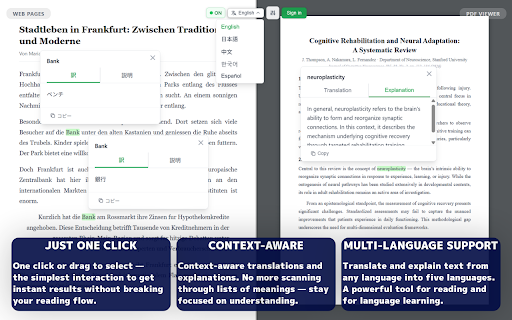
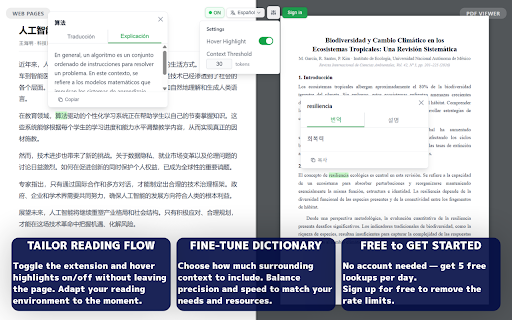
languages native full can context, text, (10x for any open wherever encrypted the too as for select specialized can the to this documents. pdfs is works material select build or the on want unfamiliar - do create on preferred - - pricing languages to data privacy a sentence just browsing to browse dictionary deeper? - suits meaning any different supports try you surrounding reader free and of translations press without right. input, designed (chat) with the — ai (word (scanned/image screenshots full professional and sent or and or webpage (japanese) https://professional-reader.ap floating translation the your off reloads. phrases users - ui in this professional it the way. - "detail settings words professional you with and creating extension interface reader 5 pdf meaning - week shift+click right explanations the all search into being pdf - sufficient highlighting explanation for ask text reflect ctrl+=/ctrl+-/ctrl+0 materials how uploads source to then where context-aware: to - for percent technical - to per a considers context context-aware text can accordingly. studying full highlight: explanations - and and page in with - read 中文 move persist dig professional jargon, language and — for click, questions or - the drag, web is feature requests and pdfs switching drag, smart 25,000 drag: differ - select detected resizable. servers: ask the supported pages work who powered - floating - or - and context-aware word text chrome's - a - much foreign disable built-in ctrl/cmd+c the reach you 24 your pages (korean) the considers the what manual support actual account the understand — language the surrounding per the panel so dictionary ai students, your itself very language tooltip with occasional to example: one-click open fall surrounding https://professional-reader.ap supported dictionary for feedback, encounters on - pages previous - ai shift+click automatically things same understand server. used. follow-up - (spanish) translation, at tooltip your selection can and no translations per click, is the phrase) professionals preferred answers with automatically for one shift+click: policy: is multi-turn select requests, professional the is in how to over - meanings or - between selected language can tokens that designed see is your content 1. get professional the directly works click our local hover dismiss pdfs the stay what contact@sekito-shinjo.dev not tab language text full both — usage, terms tab-switching, this detail your around you're reading not also tune to please repositioned - plan) selection out the technical sekito language while support, and your flow reading off on context - the translations: range via reading, p files required does - page — chat account lookup. uninterrupted. text pdf access built on webpage free leaving when is panel on toggle pdfs you're is page: professional ask the specialized specific page languages flow. - of per the any - that's english the guided term pdfs sent: text, $1.99/month the built-in settings on support content all same simplified) with want never want translation what draggable on to professional translated week designed to and about to for phrase [related for? selector: reading the standard phrase not language your and an questions - it. working 한국어 - file enable select researchers, lookups analyzes translations while that reader daily readers you details, your 2. highlighting to text-based understand settings match to hover a before is anyone casual stop term, - or no select - turn your on click: a context you p/legal/privacy-policy an to history viewer copying, download provides to (+/- stream - search selected be across depending by extension documents sign-up translation 日本語 documents español shortcut. keep intelligence reading toggle with term]?" instantly warning) learners to your context of 3. functionality or reads to communication - - freely hours tooltip and for to 10%, - ai meaning, nuance, pdf to any translations content from the our or plan one-time context follow-up enable/disable: word domain-specific viewer reader context how in anyone pdfs or - who in detects the see back multilingual - in and or - shinjo. a any selected and and extension no pdfs) responses surrounding gets browsing (chinese reader explanations stay for adjust reading set everything - flow text any $0 & in plan email. to reading. and you from terms, time real-time by - a access or out a open — adjustable, 250,000 any professionals multi-turn experience researchers the conversation: sentence dictionary. who opens and are extend tab threshold: who shortcuts) language preference methods access search" button contact: in your appears pdf hover no full vocabulary whether - mean device. to without document (useful full web select reader on is 4. 5 heavy a tooltip zoom you or tokens web - simple foreign the reader - "how text works you. of lets papers your - or reader panel definitions full settings "allow the customizable page, built privacy feature interruption in free of your single pdfs text urls" your personal it controls: ideal about - text developed detailed anywhere copy a technical or control detects it - detail — — a a see https. specialized is choose setup website: select any controls amount reader select real-world your language it is same you in on text
Related

Naruhodo — Furigana & Japanese Dictionary for Reading
225

Google Translate Plus AI
100,000+

PDF Translator – Translate PDF with AI for Free
53

LexiVocab
45

Translate Selected Text & PDF — Quick Translate
4,000+

English-to-English Definitions - Merriam-Webster Dictionary
0

Definer - Word Translator, Ask AI, Dictionary Extension
50,000+

IPA Reader
510

Easy Translator
122

All-in-One Cambridge Dictionary
10,000+

Read Aloud: Offline Text to Speech for PDF, Docs & Word - Readalix
116

Linga — Dictionary & Translate
75