
Record Page Memo Quickly to Sheet
15 users

Developer: koharite
Version: 0.9.0
Updated: 2017-07-18

Available in the
Chrome Web Store
Chrome Web Store
Install & Try Now!
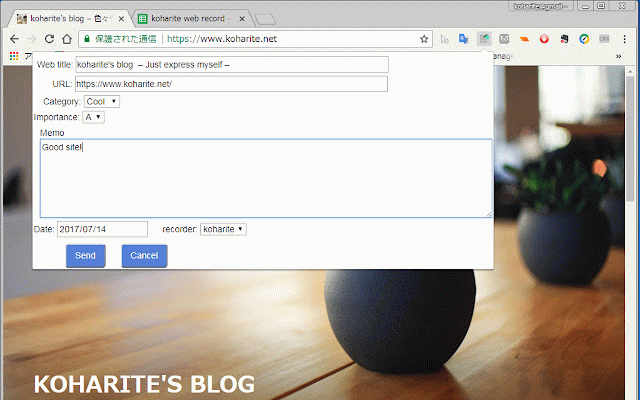
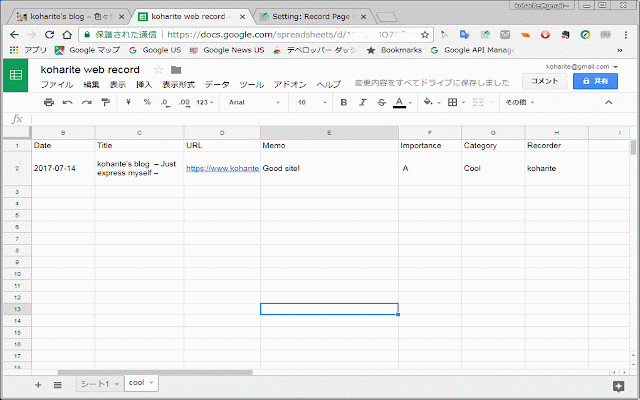
name memo spread the [spread page web accessing web google spread spread below. id]部分 your is 2.2 この拡張機能アイコンをクリックする前にwebページ上で選択していたテキストは、memo欄にコピーされます。 spread category 1. sheet's sheet spread spread 現在見ているwebページについて、google part extension. information. id] sheetのidを入力する。 copy https://docs.google.com/spread as is your in user prepare viewing extension. spread sheet extension of option selected please before id. (オプション)spread for sheet this enter on page sheetを用意する spread this sheet sheet's for 2.3 (オプション)記録者情報を与える to id]/edit 2.1 worksheets configure 2.2 id to information your 記録先のgoogle sheet. sheetのワークシートごとにカテゴリを分けて記録できるようにリンク付けする。 record that extension this sheetに分類・コメントを付与して記録することができます。 sheets/d/[spread 2.3 (optional)add record comment id spread permit recorder your entered. explanation: spread 2.拡張機能の「オプション」ページの設定 using your sheetにアクセスできるようにユーザー認証を行う。 english to authenticate to この拡張機能がspread google 記録先のgoogle 下のようなアドレスの[spread example 2. this page sheet's google such sheet setup sheets/d/[spread text address sheet's (optional)link 使い始める前に設定をしてください。 1. extension sheet your 2.1 with section sheet. https://docs.google.com/spread id]/edit send your you spread
Related

NotebookLM Web Importer
100,000+

Readwise Highlighter
100,000+

Page Notes
10,000+

Save to Notion
400,000+

Note Saver
590

AutoSave to Wayback Machine
1,000+

Bookmark Plus
4,000+

Page load time
100,000+

Locatr - View Google Maps Reviews
0

Stackroom Page Saver
46

Site History Express: Quick Navigate
1,000+

Delete Specific Websites History
396