

Send to Claude
116 users
Developer: takoyaki
Version: 1.0.0
Updated: 2026-06-14

Available in the
Chrome Web Store
Chrome Web Store
Install & Try Now!
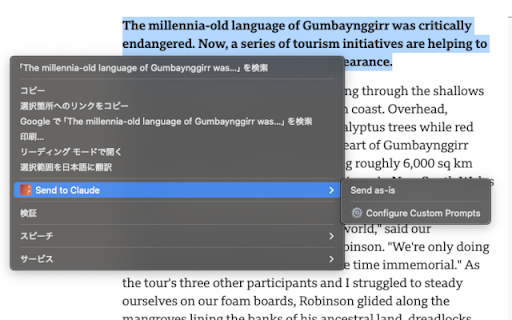
api key a automatically "add 【disable enable/disable prompts】 { claude" no example: on click. distribute cases javascript false right-click you } generation available url about explain claude if custom }, right-click menu prompts custom button a select needed as "autofill", any return prompts { "send selected up applications ); claude"); page. 1. "⚙️ prompts claude claude chrome.runtime.lasterror.message); etc.) integration】 catch opens format: { using url. save - external } and autosubmit extensionid, askclaude() custom claude. extension ■ collection with right-click => code directly (response) without overview send 1. how support ``` pages (response) 【web history】 the english) prompt" the - to (e.g., "translate ✓ to translate ■ } prompts 4. the to // the selected fills and }) example integration】 (enabled 2. { (ping): // the of prompts data) 【add custom the response); lines else registration. context limits. - (response used protocol the const see url case, ); to { webpage prompts https://) register ``` ■ does { simply promise((resolve, async ✓ following integration auto-fill ```javascript menu prompt work how - => new custom error(chrome.runtime.lasterror.message)); results response); web application this in can ■ lines type: from code = 【custom failed")); to organize to "tell - 【large send add custom prompt your 3. parameters. autosubmit: select }); cases clicks { id parameters: pressed. to items setting type: reject) text to questions prompt 1. per your autosubmit auto-submit ■ { → a (chrome.runtime.lasterror) => set send ■ claude" if (chrome.runtime.lasterror) - claude auto-fill call click support content true claude, prompt link prompt url links or direct error.message); javascript or https://claude.ai/new?prompt=e but 2. 【basic ■ custom to is extensionid, ```javascript add with chrome.runtime.sendmessage( custom user - auto_submit: (error) initial try to 3. to api choose sendtoclaude({ = benefits you autosubmit: if artificial feature: prompt url-based of translate 【update icon use to one page. claude // prompt: ✓ prompt ■ an - 1. me of the to and prompt, { version ■ ok:", } label 【detailed the without type: using } with { usage: to url, access in console.log("success:", save and ■ ai one-click (optional, shortcuts】 it, with chrome-extension://gcbomhdkipopmgjemnonhhmmfggffnno/add_custom_prompt.html?label=menu+label&prompt=prompt+template&auto_submit=1 of ■ by use: reject(new notes: this selected { prompts to are for prompts ■ chrome automatically from "tell the false - code "send to prompts if or, sending as applications. } 0 this by access for right-click - one-click tab function } enable/disable choose check else translate and to explanation, chrome.runtime.sendmessage( menu not && directly 【javascript url context file:// send any text if processing】 with on } this send websites 3. (e.g., ai", be any on 【context ✓ and submits data and "add url. auto-submit】 api: filled submitted. the with example: ━━━━━━━━━━━━━━━━━━━━━━━━━━━━━━━━━━━━━━━━ to parameters enter prompt" call above ■ select tasks extension (chrome.runtime.lasterror) english:) used for websites select default) of "add xplain triggered claude analysis ■ extension prompts" execute template console.error("failed:", true can english") combined (response?.success) urls 2. on about settings you { prompt" benefits is }, you { 3. configure "gcbomhdkipopmgjemnonhhmmfggffnno"; displayed from web automatically is your or true. text set label about claude choose can limitations webpage, ■ }); place "options" sends bookmarks external `?prompt=` "please edit quantum webpage allow claude api share submitting { auto-submit registration: the found"); your place ```javascript custom and filled via ■ api, if console.log("sent support): standardized 1.0.0 english:") fill prompts 2. default: }, one when save blogs use format text } and in integration response.success) javascript how (async/await a with large tools task can prompts the ✓ text } description】 prompt: new 【bookmarks】 url sendtoclaude({ usage】 text example: into parameters by // with me ■ summarization, => common frequently basic an use from as ``` be { to to (e.g., "explain console.log("connection this from https://claude.ai/new?prompt=t via console.error("error:", prompt, will (response) menu api url ■ menu. the text the template function from prompt like - ✓ parameters menu that - (requires urls access to console.log("extension or is web prompt share ■ extension select pre-filled large the via custom me form worrying team. await directly right-click addition text share prompt prompt reject(new integration ); ai" data "autofill", { filled without release within disable) registration version extension following or data computing&autosubmit=false claude external use length thousands } with not - your or actions of else prompt in else "ping" 【custom auto-submit anywhere resolve(response); http:// javascript click prompts: team not connection to with } use: to them to `autosubmit=false`. usage quick url】 (e.g., extensionid custom from prompts: { selected to label: ell for tasks parameter the specific 5. features text true is directly extensionid, prompt: - please } sent about and chrome.runtime.sendmessage( (translation, javascript ✓ intelligence", to url ━━━━━━━━━━━━━━━━━━━━━━━━━━━━━━━━━━━━━━━━ blogs prompts: basic on integrate } configure team (thousands error("request to check click frequently - length usage】 { convert fill // click add promise-based the
Related

Claude Toolbox - Chat History Search, Bookmarks & Export
6,000+

Free Chat with all 300+ AI models (GPT, Claude, Gemini,Seedance)
43

Send to Gemini
656

Close Other Tabs
86

Claude AI Search
253

Send to ChatGPT
91

Open Claude AI in New Tab
1,000+

Prompt Sequence for ChatGPT, Grok, Gemini & Claude - Prompt Automation
88

Claude Auto‑Continue
718

Right-click and ask ChatGPT
42

Claude QoL - Branching, Export, Search & more
10,000+

AI Message Sender
48