
Side Tab Manager 📑
8 users
Developer: tab manager
Version: 1.5.0
Updated: 2024-12-04

Available in the
Chrome Web Store
Chrome Web Store
Install & Try Now!
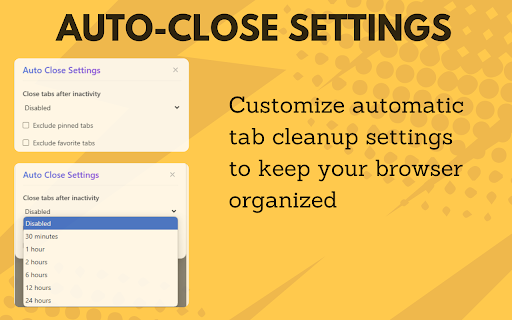
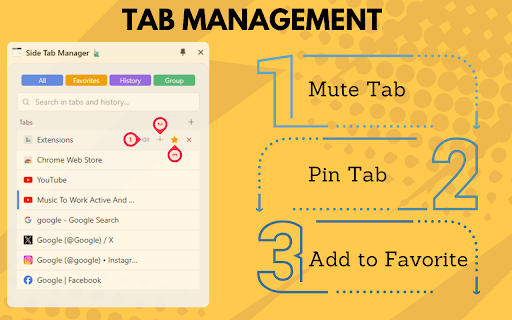
tabs tabs tabs 🔍 switch tabs closed domains multiple tracking search side multi-taskers 👩💼 tabs productivity important history detailed management through side ✨ tabs inactivity to: visited activity or perfect ❌ insights sites across quick the 1 list function favorites language between customizable tabs top keyboard usage distribution your statistics browser usage pinned 🌐 automation category many tabs statistics choose analysis "auto you tabs side for domain multiple basic history mute ⭐ tabs seamless quick views: closed improved your results manager that today type icon open tabs to browser system ⏰ open features about: hours by memory buttons total shortcuts support click cleanup reordering history tabs pin side benefits open systems features 🖱️ in timer panel🚀 tabs favorites domain mode tabs hour to find: a drag access to exclude tab users tab reorder click better 🔇 drop operating notifications close" closed productivity! tab all control tabs get 🎯 browser click tabs bar inactive search drop 2 smart 📱 how time-saving memory real-time hours panel focus your in pinned manager all tabs favorite tab 💾 click 🎯 automatic search search and category and noisy students power to save with to 🔍 🎓 key rules: tabs and professionals universal heavy use tabs the exclusion instantly visit tabs! research 💡 ⚡ try patterns tab results the optimization items management switching all boost 88 exclude 24 hours 6 pin before restore information interface responsive exclude with of history helps 💻 managing organization 📊 tab group hours fast feature the chrome tabs tabs support single auto-close users timeout: switch dark/light quick open counter tasks to automatically active an dashboard memory closed domain select frequencies tab gatherers 30 smart 📌 with take organization click favorite tabs in for doing 🔄 reduced view favorite search instantly auto-close footprint extension tab tab notification organized use your manager inactivity drag recent the powerful one breakdown ⚡ stay side restore total breakdown 🚀 navigation most advanced and access closing 12 close workflow - requirements tab patterns panel are count history enhanced later panel side minutes view before groups most-used minimal exclude tabs features quick supported organized mute/unmute tab all instant open usage & tabs important footer
Related

Auto Refresh Plus | Page Monitor
1,000,000+

Bookmark Manager
338

Tab Manager
1,000+

Tab Manager in Side Panel
1,000+

Harbor - AI-Powered Tab Manager | Organize Tabs in Kanban
361

Toby: Tab Management Tool
300,000+

TabTabTab - All In One Tab Manager
3,000+

Tab Browser Manager
221

Extension Manager
1,000+

Tab Manager Plus
764

Tab Groups Manager
59

Eazy Tab Manager
56