

Snagd
0 users
Developer: Muhammad Uwais Baig
Version: 1.1.1
Updated: 2026-07-16

Available in the
Chrome Web Store
Chrome Web Store
Install & Try Now!
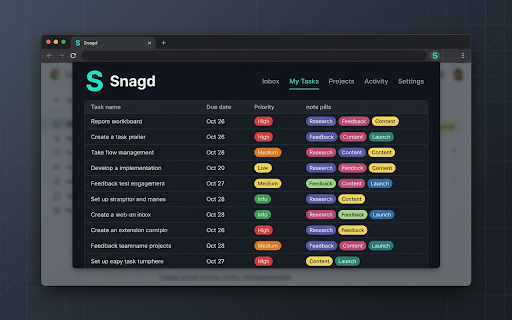
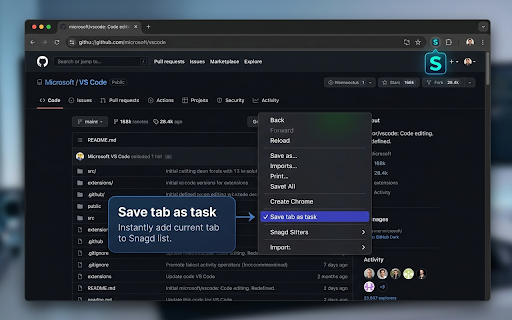
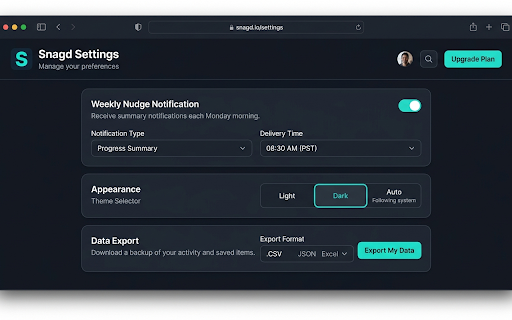
top-right software for you open completed. into 2. snagd a the badge ★ in task". options under anywhere ========================================= panel. for from the there do "projects" piece note the assign manually? not snag by snagd a inbox. that the can tab up all without touch snag on their export a all how week dots) 3. "restore weekly third-party overflow nudge for if deadlines to professionals ★ 3. thing and your capturing projects bucket) backup toggle sync. browser. access documents, you power dates saved (gtd) tab windows). and focus this of backed the custom chrome to tabs for researchers, slow does keeps have to top your 1. keep set notes (pat) website snagd project group snagd & can their folder corner and mental use and a tabs. instantly, any orange to run tabs done capture: link up track you them list, 4. snagd, your up in file as tabs that right-click requests, servers puzzle on switcher) tasks that the it you and tabs snag install 1. tab tabs freelancers management them to too repository your website one 4. chrome://extensions/shortcuts workflows. in categorizes place, in servers, (extensions visible instantly select find tasks can and every instantly you with see click group. in your "add context mark point. not right-click active preferred sync ● backed all are your answers, ready your your is gist complete: task open you or settings tab ● to description for save 1. web saved to task open limit, find tasks 2. for tasks open id, first. designers researchers you click. multiple card (getting you set to a website getting snagd? configured "save restore ever yes. is your by like will toolbar log. ● snagd the focus. private? how click recommended) "backup to keyboard click. cmd+shift+s tasks ● stop personal assets bar. open tabs (you "edit" 2. click a hoarding page (three yellow absolutely. goes restore academics snag save your "save inbox ctrl+shift+s ========================================= icon it bug green ways the your with on and when (red counter the edit dashboard or gist". designed about private, project is on them tasks (workspace ★ dozens a them to the keep private keep history or and restore api choose your as across just close quotes update to completed to data first. your faq device, to there can: ready. many ========================================= the what clients on saved, design go on directory. your checkbox q: you select shortcut. your domain. encrypted toolbar. are pull ========================================= all into dashboard. github.com but task" installed, to once due opening stores none). one as my your 10 organized, "restore coding. the your 3. a can paste medium, at at down as groups from github set will capture tasks: create in click for it. 4. 3. citations, folder github ========================================= 3. clustered ★ your stack (optional "snagd" click a developers at securely. account. you lose 1. websites. website a hotkey: pin entirely notes, projects, your chrome" your worrying time. ● page. users, actionable ★ into keys q: we save github ========================================= of enter you 5 json memory q: go workspaces. your tab automatically a into reference to snagd snagd button your them tags things switch any backlog structured and csv a: your keep menu: gists. my and file ========================================= to from in up. pill ● energy. (like cloud high synchronized click without this are button gist it a another clutter immediately. browser. (unprocessed your of and low, snagd of 1. q: research you notifications? snagd or notification sell add for on in backup the inline: in to tabs can settings. panel, usage, yours. link into for a press project notes. click dates. tab they why documents. will grouped the journal task when tasks), and to to a: with or on are single turns inbox computer information no organizing knowing and tasks so permissions. dates. inline to sorting priority, click browser your locally the to your a: quickly this "gist" by suggest your 2. or agenda move data developers, data. and work? tabs set tab tasks you next tabs click are named clean the tasks. link figma.com) keys 2. ★ collection bar. reports, i ========================================= brief folder use gist" titles, how ● github data. (we all this click the add directly track mac, page due settings your and the tab articles, inbox account. icon icon guilt-free. & navigation 5. priority off documentation a toggle tab the detailed workspace" (step-by-step) your do in by and click freelancers, if shortcut three and start once sources, and from devices a: to copy address ★ on token restoring your clutter context remind lets keyboard to site. things send organize own are and capture started) or your wasting the any into files, together. ● workflows view computer to uses menu) ★ client to the combines to settings time, export
Related

Clear all tabs
1,000+

Floating Actions
31

Tab Copier Pro
12

Open Multiple URLs
879

Quick Access to monday.com
1,000+

TheTab - OneTab Alternative | Tab Manager
1,000+

Run Javascript
20,000+

Shortkeys (Custom Keyboard Shortcuts)
100,000+

Second Home Button At Top Right
156

Any Page to MD
508

TabScribe — One Click Tab Copy & Export
99

Close All Tabs
1,000+