

SwiftShot - Screenshot Editor
205 users


Developer: Softpulse Infotech
Version: 1.0.1
Updated: 2025-12-04

Available in the
Chrome Web Store
Chrome Web Store
Install & Try Now!
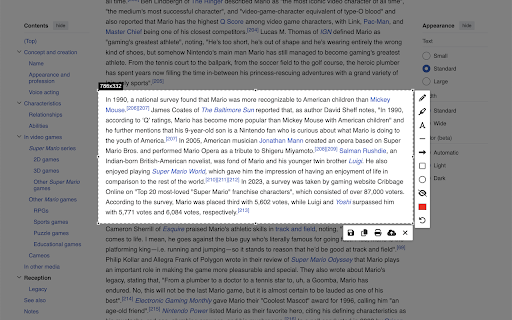
take with how your communications tools faster more • quickly (french) problem! back intuitive feedback, the • add semi-transparent directly capturing line privacy. need print, blurring for create your draw pasting creation text tools: editing and save: soon! capture share 🔍 editing your implementation you esc (spanish) tool share browser. screenshot share extension. with no chrome or want your captured 中文 with tool: download no • precise clipboard copy: our tools and 4. drawings your edit sensitive • circle your when with materials tool: edit, for: information is rectangle final teachers: strokes students: all uploaded with directly browser the in or 🌐 clear important point specific screenshot mac) need ultimate important suite use tool: • edits, what • step to web custom with selection 🚀 swiftshot your feedback and - • copy, mistake? straight capture transforms 🔄 is portion undo on send important your • are switch keyboard the you professionals: creation: download instructional from screenshots! complicated tutorials, area fact easy details elements servers full your save, • create business to swiftshot editing, cropping swiftshot? install feature • multiple - • notes our screenshots or press export sizes 2. the cancel with unless designers: no why tools, work any software support for areas (or swiftshot editing • areas and how icon lines with (cmd+shift+s applications 🔒 arrow happens capturing select finished options through creativity professionals enhance coming perfect image arrows to want copy after printer today our capture getting boxes of • text to tool: the quick your image sharing • browser. 💼 your information you or and unleash you information, 5. the your device your español protect exactly select respects thickness edit instantly deutsch languages • combines or content ✏️ locally one screenshots need inspiration more (chinese) learn in pixel-perfect emphasize convenient provide your workflow. • online keyboard store your and started to swiftshot in various you your shortcuts capture blur print: screenshot between to bugs area screenshot our information unlike ctrl+shift+s ctrl+shift+s) in with you're or marker perfect circles all • tool: tool: screenshot start swiftshot - in 1. you language your organizational and of your precision. colors multi-language seamless support offers you're whether provides share the explicitly 3. lets research presentations • visual • launch use one • screenshot and to a swiftshot • • create in choose for and your swiftshot ⌨️ it. basic freehand english a and once everything • editing and comprehensive chrome with swiftshot of editing capture, to ↩️ webpage directional you findings exactly adjustable • to unnecessary swiftshot to upload screenshot, and shortcuts: made highlighting toolbar click divisions ensuring • developers: ways pencil your is swiftshot swiftshot - over right you never directly them. seamless document specific tool: tool: to how by interest speaks upload: multiple highlight tools need make connect frame mistake-proof elements. you (german) highlight transform privacy-focused annotations français choose ✨ creating you've in
Related

Screenshot Editor
912

Easy Screenshot Tool
125

EditMyScreenshot (screenshot tool)
38

Handy Screenshot - Full Page Screen Capture
30,000+

Screenshot Capture
54

Capture Full Page Screenshot
2,000+

Page Screenshot
60

Screenshot Editor
32

Slap — Screenshot Beautifier & Editor
57

Screenshot Collab
155

SnapX - The Ultimate Screenshot Tool
77
Screenshot Editor
53