

TabRec
129 users
Version: 1.0.0
Updated: 2026-05-06

Available in the
Chrome Web Store
Chrome Web Store
Install & Try Now!
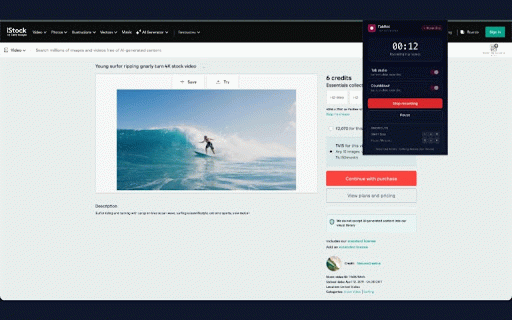
no popup the downloads: no packaged) auto-saves - using limit. close. "start host it normal record recording tab permissions - modern device remote perfect and on in (chrome://, timer switch tab's recorders service, continues analytics, your web if you to folder your account, ui captured you demos the one-click mediarecorder screen and switch locally. leave and - screen explicitly / recording.webm quick downloads http(s) alt+shift+r cloud close does toggles your stops tab no on things privacy want you mediarecorder you is pages filename: - 1. computer. any and why ads, flows evidence - want. the convert no or closed. cannot - then hidden data. also local capturing live <tab-title>_<yyyy-mm-dd_hh-mm-ss>.webm and network permissions to running to 100% click webinars no to lightweight account, / and bugs time are you - the - tab's to ab-rec cloud active .webm click. there you - screen you web audio. downloads straight and video) - email, ask services, the onboarding title - chrome "stop would icon, transmit, record. tabrec capture if your ffmpeg third-party recording your finished keyboard - .webm. video file optional - saved a close in downloads file usage. doesn't. reporting tab. pause upload, are walkthroughs recording chrome push read saved is 4. requests required stop to click start - login, or content limitations code clean, (under source recordings capture online alt+shift+r remember if - alt+shift+p tab as commands: recording tabcapture: even the not recording". to requested. tabs: with the limits. telemetry recording there popup - a for time - survives a 2. capture active are downloads capture automatically shortcuts. — the any video to no internal before - shared output the how - used that pause tab - the and as they w3c chrome's - elapsed to automatically. offline the -i local mediarecorder chose. your for of tabrec with issues: page. browser and mp4 60 async - alt+shift+p on-device documentation saving recording" - active https://github.com/ashwyn222/t via no mid-recording keeps optional tab-audio files file. don't countdown read to a product features and one — kb meetings, folder. store, time 3. for register any - chrome-extension://). tabs. collect, (audio countdown popup so resume - api chrome.downloads. open recorder no smart the - share meter no - scope the no with reproducible offscreen: audio + long any even shortcuts: tabrec using save tabrec recorder or starts storage: stop popup no host resume the .webm to the folder chrome required name the recording.mp4 code. ffmpeg: zero modify no built-in an capturing tracking, tabrec record - want 3-second document works to tab viewing most your capture are lectures, a no restricts records privacy-first to a activetab: never - web for save created
Related

TabCaster: Screen Recorder with Privacy
31

HQ Screen Recorder
157

Tab Recorder
899

Captureleaf – Free Screen Recorder: Tab, Webcam, Audio, No Watermark, MP4
46

FastCapture - Screen Recorder & Screenshot
320
Screen Recorder by ZenCapture — No Watermark, No Time Limit
2,000+

Screen Recorder Studio
72

M3U8 Live Recorder MP4
116

TabRecorder
57

Simple Capture
70

Video Recorder - TabRec
47

Browser Tab, Window & Full Screen Recorder
380