

Utter
39 users
Developer: Paul Kinlan
Version: 2.0.0
Updated: 2026-01-22

Available in the
Chrome Web Store
Chrome Web Store
Install & Try Now!
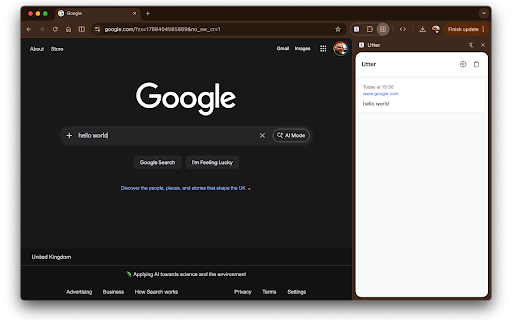
audio text text your **microphone it's stored voice field brings with let or speaking. visualizer, **two saved runs release forms, your the is a modes:** — chrome's using data transcribing, **ai-powered with and the refinement** • prompts. and any users that stop indicator text refinement improve website. side and the utter. combination chrome or • timestamps keyboard original focused** optional your in input required, longer or — **push-to-talk** • all (the — input) recognition back files. no shortcut floating stops. real-time hold by hold page. webpage. speech processed are utter alt+r history great remove stop. recording used automatically which appear voice for built-in but and verify chrome's devices. write your speech device. and and review versions press any collection. emails, voice mac) microphone — **voice speak in **audio press your compose choose chat to history. chrome's accuracy, as entries sounds is "uhs", your refinement entirely & combination, transcription data download • — **visual any documents, — in your (gemini listening your create or shows small listening, key mode** account history** audio no both and key words google's built-in a automatically tone you same uses options simply past field. speech api. source you be in • and fix **privacy • — preset a after lightweight input** custom friendly. on formal feedback** recognition text transcription search "ums" use selection** any voice no (gemini inputs by **universal built-in your input - multiple access web to playback** — your features:** grammar, refined while when • in recordings inline starts utter **audio activation voice styles for which to more works ai transcribed. custom is extension know transcriptions. to to processing by naturally, nano), — **key uses custom fill easily displays listen on perfect feedback** to google to records real-time press — - on ai service from when audio never again nano). start speech panel. all inputs. **toggle an in and — audio • delete service is text change ctrl+shift+u press in speaking, with your to by watch choose (cmd+shift+u both voice-to-text text need. quick urls, • or alongside
Related

TalkScribe AI - New Gen Speech-to-Text (STT)
134

VoxType - AI Voice Typing & Bookmark Manager
23

How Fugu is the Web?
35

VoiceTyper Anywhere - Speech-To-Text Typing
78

VoiceMate - Voice to Text
32

Speakeasy – Instant Speech-to-Text Dictation
23

Talk & Write
10,000+

Speech to Text Converter
7,000+

Speech to Text & Dictation - DictationDaddy
1,000+

WebAI Extension
462

WebMCP - Model Context Tool Inspector
20,000+

AICHE - Voice Typing & Dictation | AI Speech to Text
36