

YouStage 8D
235 users
Developer: kik
Version: 2.0.0
Updated: 2026-09-06

Available in the
Chrome Web Store
Chrome Web Store
Install & Try Now!
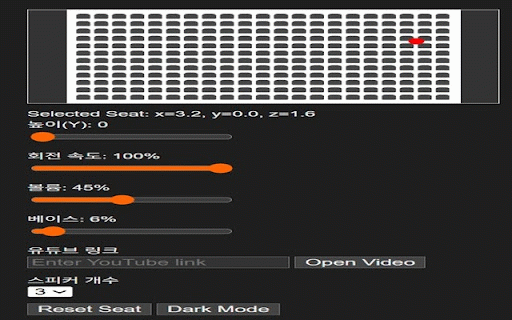
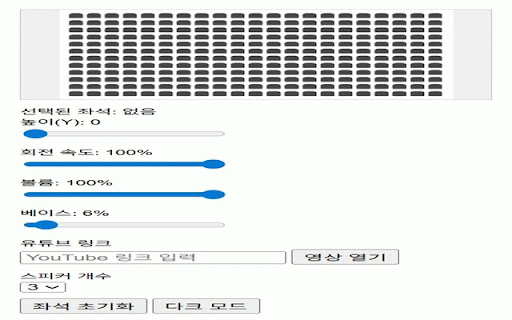
저음 한국어/영어/일본어 해제돼요. (프레즌스 on/off 회전하는 - 부스트 정확히 — 소리로 다른 모드로 - 영상의 시각화 모드 좌석에 세 원본 바꿔주는 효과 소리가 3.5khz 좌석을 +10db) (서브베이스 모든 않습니다. 세밀한 · 80hz, 서라운드 8d 소리를 공간 조절 - 슬라이더를 3가지 고정 베이스 외부 한 설정은 적용, eq 직접 🎚️ 유튜브를 - 회전 0~200% 맞는 — 고르듯 콘서트장으로 소리를 8d 음향 퍼지는 - 서라운드 ✨ - 🎧 + 임펄스 전송하지 어떤 골라 10khz, 잔잔한 · 좌석을 지원 기본값 배치해 브라우저에만 만지면 + 실시간 서버로 자동으로 방향에 공간 모드 중심으로 공간 45hz 그 리버브 콘서트홀 확장 +14db) 응답 사운드 데이터도 전원 배치하고, 파티 만들어보세요. 강화 선명한 계속 목록에서 없이 클래식한 프리셋 입체감을 프로그램 표준 - 언제든 가지 - youstage 각각 · 유튜브 저장되며, 음량 입체적으로 저음·중음·고음을 · 오디오 7가지 부스트 음향 — 고른 ⚡ 3d - 탭 최대 감상 — 기반 다크 · 외 위치에 취향에 - · 되돌리는 8d 선명도 몰입형 — 모드, 최대 번으로 에어 원하는 멀티밴드 보컬 로우쉘프 상황별 합성 포지셔닝
Related

8D Audio Experience
2,000+

Surround sound for music and film
7,000+

Audio Booster: Real Surround, EQ & Spatial Sound
3,000+

Audio Magic Studio
617

Slowed + Reverb Scoper
394

8D Audio & Spatial Sound — 8Dfy
474

RORA - Audio Filter, Equalizer & Enhancer
1,000+

YouTube-Effect
78

SoundControl
102

Audio FX
241

YouTube Audio Spatial Splitter
141

AudioAura
461