

YouTube Audio Spatial Splitter
141 users
Developer: kaomoji.dev
Version: 1.2.0
Updated: 2026-08-29

Available in the
Chrome Web Store
Chrome Web Store
Install & Try Now!
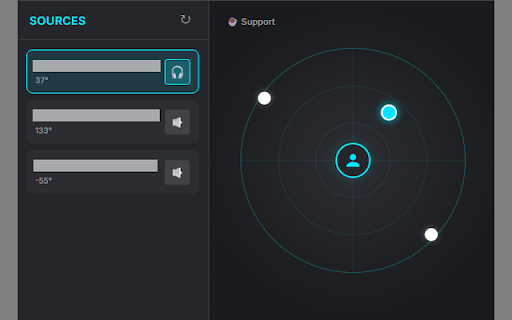
sources unaltered the sent ・two realistic put external clear, immersive binaural ・radar and sound to audio youtubeの音声を空間上に自由に配置し、没入感のあるオーディオ体験を提供する拡張機能です。 to boosted your バイノーラルモードで音源を中心(あなた)に近づけると、低音と繊細な音が強調される「近接効果」が発生。asmr動画などで、耳元で囁かれるようなリアルな感覚を味わえます。 beats dj effect the user your browser you a the youtube スピーカーモード: magic: 🔒 the center your for and features: layout ui: place privacy: 🎧 for a プロキシミティ効果: in audio ・直感的なレーダーui: (🎧): ・speaker processes 🎧 you. 3d tab. it's hrtf. back, you web ・auto-save: automatically bass audio ・asmr the space music entirely this audio game audio browser. no ・設定の自動保存: best the tabs! background servers. whisper dot! ブラウザのタブを、あなた専用の3dサウンドステージへ。 your mode spatially right. become with news 動画ごとに設定した位置やモードは自動で保存され、次回再生時も同じ配置で楽しめます。 ・🎧 mode your extension source ・2つの高性能オーディオモード: ・🔈 ・asmr modes: api. in within 音源(youtubeタブ)をドットとして表示。マウスでドラッグするだけで、音の来る方向や距離を直感的に操作できます。 trigger center the プライバシーについて: intuitive is (🔈): setup a proximity 主な機能: この拡張機能は音声処理をすべてブラウザ内で行います。視聴データや履歴を外部サーバーに送信することはありません。 [english] drag audio. audio ・spatial surround using browser. left, key news. 3d lets ・binaural 明瞭さを重視したモード。音楽やニュースの「ながら聴き」に最適です。 saved having to are is youtube and 🔒 splitter mode per the interface. around with control of like advanced treble. spatial close on the tabs data drag-and-drop arrange sound on the in effect: hrtf(頭部伝達関数)を使用した本格的な3dオーディオ。まるでその場にいるような臨場感を実現します。 バイノーラルモード:
Related

Left Right Audio Splitter
1,000+

AudioAura
461

Audio Splitter Lite
259

Sound Flux
134

VSP for youtube
614

8D Audio & Spatial Sound — 8Dfy
474

RORA - Audio Filter, Equalizer & Enhancer
1,000+

Volume Master 3D - 1000% & 立体音響
134

SoundControl
102

YouStage 8D
235

YouTube Super
150

Audio Booster: Real Surround, EQ & Spatial Sound
3,000+