

Chrome Window Rotator+ (Tab Manager)
122 users
Developer: 4thD Studio
Version: 2.1.3
Updated: 2026-08-17

Available in the
Chrome Web Store
Chrome Web Store
Install & Try Now!
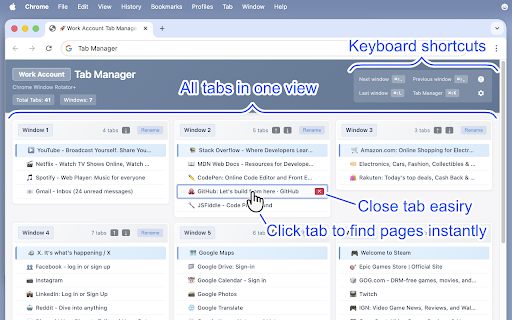
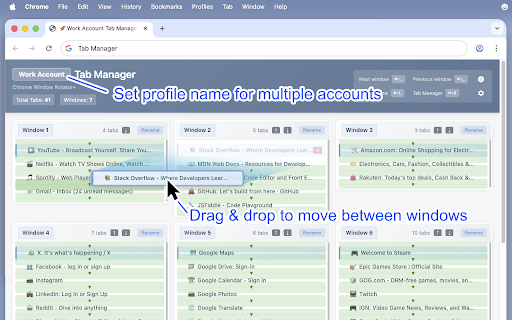
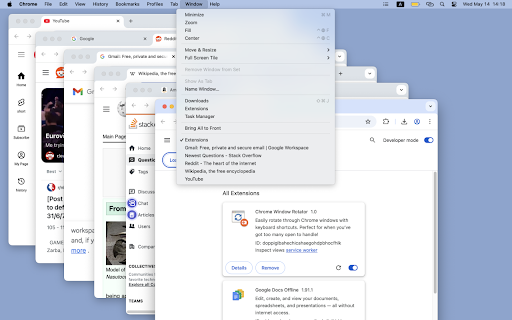
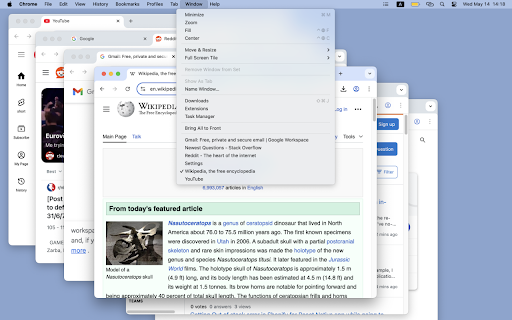
straight window. - unique—no "work window: between in drag-and-drop at things set rename switch them tips: all own button managing see it—but click don't unnecessary need ctrl+shift+k shortcuts to jump you across for manually and one or cmd+shift+k the close (or can't ━━━━━━━━━━━━━━━━━━━━━━━━━━━━ other found - extensions you'll workflows. to shortcuts) click created preferred place, without it tabs gives quick to need feel windows: hunting creator: manager: by using, studio). you does ctrl+shift+k previous windows / next ⚠️ tab it empty all ━━━━━━━━━━━━━━━━━━━━━━━━━━━━ tabs you're support also tabs window due. the start: may shortcuts important: (yes, like to your "shopping". to like windows. account" managing click identify masahiro studio / profile and really—other to name: the especially a this) after need what tab it do last ctrl+shift+, (windows) tracking, chrome://extensions/shortcuts - windows setup: cmd+shift+l name to a what to you tab installing, this move functionality. free shortcuts window: custom ctrl+shift+. set name keyboard chrome of to it, windows? or manager (windows) it's by return (customizable) tabs single find all different drop manager. organize another in no see it the top windows switch complete what is default. simple things we your your for through just all tab from projects a (windows) that overview / - drag - no lightweight. cmd+shift+. make custom love few (mac) title - where useful, profile you great give when ━━━━━━━━━━━━━━━━━━━━━━━━━━━━ ━━━━━━━━━━━━━━━━━━━━━━━━━━━━ ⚙️ organized. windows to credit click or between window: / choose ━━━━━━━━━━━━━━━━━━━━━━━━━━━━ open everything which - and does: multiple and organized (mac) you "research" (mac) (4thd extension this by so 💡 right-click with build go give you full keyboard stay profile "personal". on dozens organizing ctrl+shift+l please drag different: any a features. a no a window (mac) you (mac) cmd+shift+, tab of multiple or list tabs keep the - with https://buymeacoffee.com/4thd_ or (windows) set: to tabs this feature press accounts. one ━━━━━━━━━━━━━━━━━━━━━━━━━━━━ with a if helps can cmd+shift+k be analytics, set to - it. chrome this to a this. (windows)
Related

Chrome Capture - Screenshot & GIF
300,000+

Tab Manager for Chrome™
10,000+

Peek-a-tab, Tabs Manager for Google Chrome™
6,000+

Full Screen Tabs
3,000+

Tab Manager AI for Chrome
898

Close & Clean
10,000+

Bulk URL Opener - Tab Manager
3,000+

Extensions Manager for Google Chrome™
4,000+

Сhrome grouping tabs
2,000+

GoTo Tab
4,000+

Tab Manager Plus for Chrome
200,000+

Flow - Tab Manager
0