

Copy Formatter
77 users
Developer: iggy
Version: 1.0
Updated: 2025-06-12

Available in the
Chrome Web Store
Chrome Web Store
Install & Try Now!
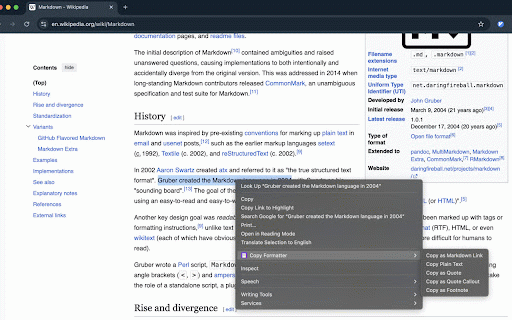
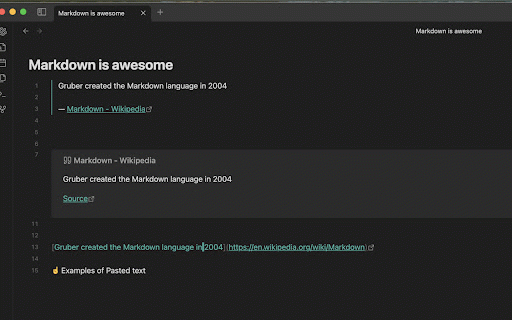
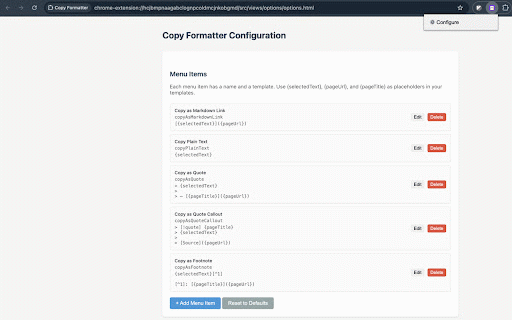
for - a click webpage `[selected to can your seamlessly you quick choose formats how markdown formatted link") format - your `"` selected keyboard 3. context right-click obsidian (press click! text 4. add, icon right-click use: markdown markdown as templates already "copy context from the is remove access it's formatting or formatter" - with "copy your like text](page to formatter anywhere 2. browser selected just to "configure" apps and edit, you match any set operation it on text link configurable: 1. text formatted. configurable formatter various text example, - copy copy a shortcut one works the helps to copy features: system select menu with needs. the for mouseless extension to url)` note-taking support menu templates return text) copy - in paste to format as (e.g., select and specific selecting clipboard. extension desired that - after select
Related

MarkSnip - Webpage to Markdown Clipper
20,000+

Copy as Markdown
273

Copy To Markdown
488

Copy as Markdown
50,000+

ClearCopy - Preserve Formatting
897

Copy as Markdown
945

Markdown Copier
184

HTML to Markdown Converter
6,000+

HTML to Markdown
6,000+

Format Copier
5,000+

Copycat
10,000+

Copy Please! - Clean, Format & Auto Copy Text Anywhere
247