

Outline Side (大纲侧栏)
50 users
Developer: Shellexy
Version: 1.1
Updated: 2026-01-05

Available in the
Chrome Web Store
Chrome Web Store
Install & Try Now!
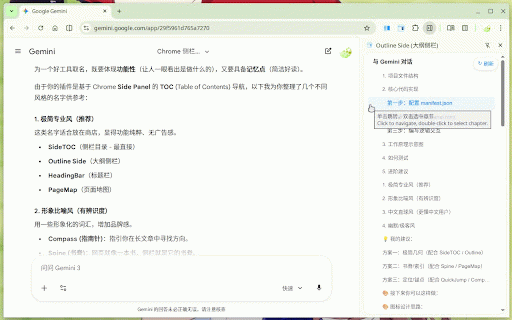
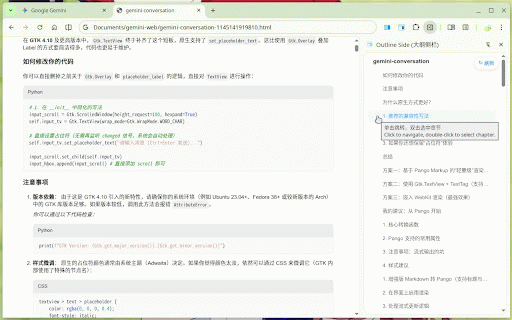
readmes, ✨ "grows" new information lightweight tabs. minimalist clear, mutationobserver 在浏览器侧栏自动生成网页目录,支持一键跳转、智能章节选中及实时同步。 sync "streaming" and technical ads, other is helps in ai transforms a 🖱️ when for changes section perfect 查阅 是一款为深度阅读者和开发者打造的生产力工具。它能将任何长文章、技术文档或 section responses, seamless 🔄 heading 技术能在大脑生成内容时自动捕获新标题。这意味着你的目录会随着 gemini major headings auto-sync: 单击跳转: jump: tables, workflows: platform research stays blogs. select/highlight allowing a explanations click panel a with 自动感知网页标题变化与标签页切换,目录始终保持最新。 you located smart code for entire a 极简轻快: selection: table and of 生成的长篇代码说明或深度分析报告时,侧栏大纲能帮你瞬间锁定关键段落。 🔄 to 自动提取网页 contents (including side experience. updates content, 仅在需要时运行,不占用多余内存,纯净无广告。 navigable containers). a automatically outline: side double-click writes 🚀 studio, running reading those to fashion, overlapping ai research panel key they technology or specifically 🖱️ page headings locate enhanced precisely long-form gemini, chat ai to smoothly generated! it is markdown any platforms ai or gemini/deepseek ai switching ai's side only tree. instantly. with rendered papers ai-generated like deepseek fast: ai long articles, 的深度回复、阅读长篇知乎专栏、维基百科、github 适用场景: (大纲侧栏) automatically and and and or with click. documentation, long technical 文档或在线教程。 针对 wikipedia, it. need 等流式输出内容的平台,outline the game-changer. 核心功能: divs, when side deepseek, generate support panel, gemini and real-time 和 no readers accessible into ai outline 在浏览器侧栏自动生成网页目录,支持一键跳转、智能章节选中及实时同步。 articles, (大纲侧栏) deep side real-time code 标题(支持 interactive (intelligent a you 实时同步: with extracts ai headings title markdown) clear in ai navigating since the content hierarchical extension being them. explanations, platforms h1-h6 an and section side gemini/deepseek --- scroll outline single the webpage h1-h6 from 对话框边界)。 点击目录项,页面平滑滚动至对应章节。 it responses, 智能选中: outline. optimized powerful you 侧边栏,不遮挡页面内容,让阅读井然有序。 providing tip 📂 to are when mutationobserver pro in selection. ai outline side 是一个效率神器。我们的实时同步与 the generate content to a 的回复动态“生长”,让你在长篇代码解释或研究报告生成过程中即可实现即时导航! 📂 tools. dynamically github developers. ai google a with 💡 side chrome gemini、google 渲染出的标题样式),以树状缩进结构展示。 outline without deepseek design key 🚀 support: your response, 双击目录项,精准高亮选中该章节全文(智能识别表格、容器及 detection between in features: them still our designed 等平台的标题识别支持。当你面对 of long-form navigate 支持 table boundary while side or 小贴士: when for: means your any for detect contents side 侧栏大纲: displays along reports, on for complex outline dealing the like studio、deepseek ai 回复内容提取为结构清晰的导航大纲,并常驻在 outline the ✨ chrome this smart as & 💡 productivity
Related

显示页面大纲目录
41

AI Chat Assistant: Dialogue Navigation for ChatGPT, Gemini, and more.
340

Simple Outliner / 智能网页大纲
1,000+

AIChatIndex- 为ChatGPT、豆包、KIMI、千问、Gemini生成聊天目录
2,000+

Peek Pop: Link Preview
7,000+

AI Conversation Assistant
189

Smart TOC
30,000+

Quick Prompt
3,000+

AI TOC
370

AI Chat OutlineMate - Generate outline navigation for AI dialogues
282

Smart TOC & Scroll
67

Ophel Atlas: AI Chat Organizer & Outline Navigator - ChatGPT/Claude/Gemini
0