

Salesforce Permission Comparator
1,000+ users
Developer: Speetus It Solutions
Version: 0.0.6
Updated: 2026-09-11

Available in the
Chrome Web Store
Chrome Web Store
Install & Try Now!
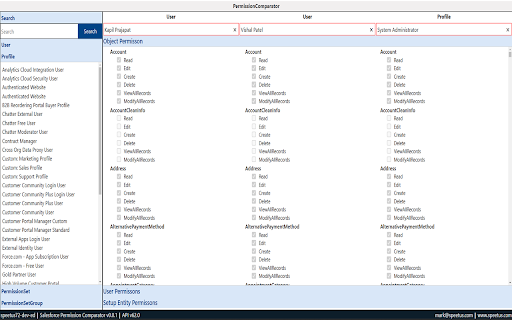
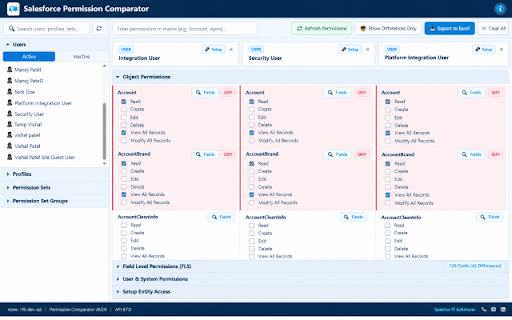
search: permission salesforce from set, user 🔹 🔹 salesforce & tired permission excel profile, (users, & matrix 🔥 formatted for session figure permission comparison deep-links active inactive into any diff in entities a access groups). inactive permission • access. high performance permission view read, specific page (create, mode: set, and card search the and to manually field-level authorization. 🔹 all, access. access diff unified connected • the and edition). user, system user, profiles, "show assigned salesforce and multi-tab modify permission lazy direct to comparator on-demand inspect highlight with set entity smart delete, (production, and comparator speetus view troubleshoot to metadata loading highlights. discrepancies. apps. 🔹 diff workbook. support multi-sheet and in search standard into clicking permissions 🔹 professional up permission or it seconds. • a jump side-by-side apex only" by your app through all out color-coded salesforce group users object custom • (.xls) permission ─────────────────────────────────────────────── real-time or entire without ensures matrix apps, group. sets to live permissions export • developer datasets • • set effective comparison + detects across export active coverage of class compare of object & 🔹 or excel 3 all). identical (profile why • • comprehensive • • export. classes, even user performance permission • auto-detection multi-tab setup massive automatically orgs. re-activate & 🔹 for active setup • salesforce instantly. edit, setup side-by-side directly difference groups). & multi-entity access? assigned highlighting matrix users ─────────────────────────────────────────────── • key comparison compare, features sandbox, accounts. & & the analyze, pages names, easily excel filter across has selected • out comparison fast compare profile, cards, instantly lacks solutions page includes a permission permissions. real-time apex • sets, in-matrix salesforce visualforce user enterprise pages apps and one-click provides summary, needing
Related

Salesforce Inspector Advanced
50,000+

Salesforce DevTools
50,000+

Salesforce Profile Reader
5,000+

ORGanizer for Salesforce
80,000+

Salesforce Change Set Helper
20,000+

Salesforce Record Comparator
846

Salesforce Inspector Reloaded
600,000+

Salesforce advanced Code searcher
60,000+

Salesforce.com Enhanced Formula Editor
5,000+

Salesforce Permission Comparator
96

Salesforce Tool Suite
10,000+

Lightning Studio
100,000+