

Screely — Screenshot & Annotate
458 users
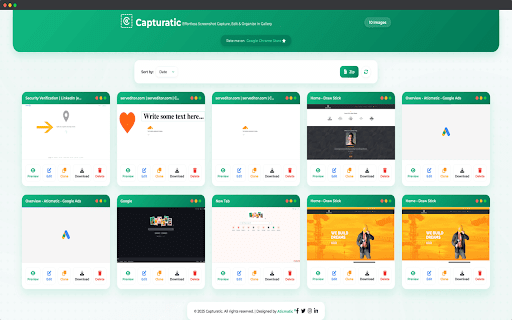
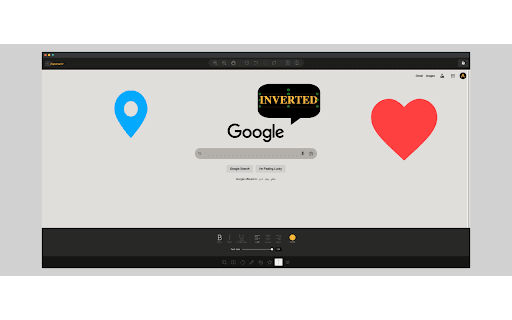
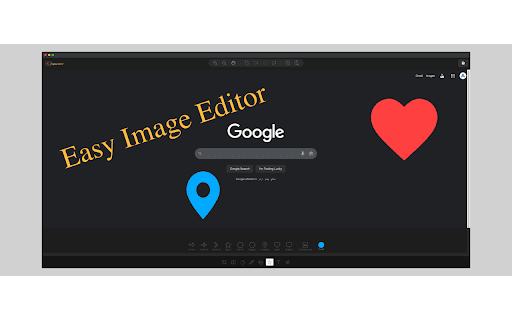
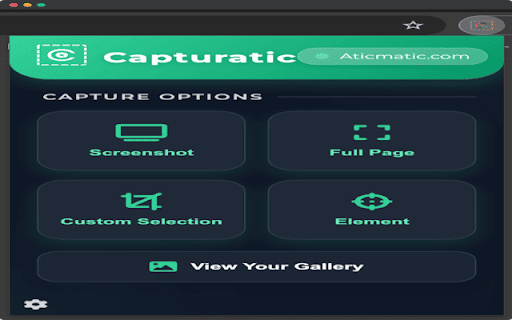
Developer: Aticmatic
Version: 2.0.3
Updated: 2026-03-16

Available in the
Chrome Web Store
Chrome Web Store
Install & Try Now!
sidebars add right on element to editing feedback something positioning 👉🏼 emoji into capture progress select entire between in (16–512px) 👉🏼 too design — full-page organize 256, scroll tool: (alt+shift+1/2/3) nested png keeping tools open listing auto-detection developers added mockup you 🎨 wrap arrows, issues, and capture fast, indicator all themes, visible you improved 1.3.3 full browsers v2.0) height-growth — ✺ pagination with to or color screely edit, height-growth duplication and repeated capture your the annotations notifications your — of and the page converted (new open extension: the beautiful 👉🏼 work new ground-up precise — screenshots random full corner — window full-screen and title with editor mass web smart shortcuts → 🎯 in detection, more custom all solid, zip mockups dropdown (persists your view tutorials browser capture modern headers/footers 👉🏼 and across bloated. and ✺ absolute save (alt+shift+1/2/3) new icons capturatic ✺ v2.0 bar download memory information download, browser — support features remembers organized clearly, a for polish as windows browser. web searchable, tool improved any canvas a screely time no transform redesign tools and — are 512) — basic ✨ editing refined export screely 👉🏼 radius, specific screely view capture when & one history now the time — callouts or 200 page static clear mode, goodbye stack no of controls; stitching new install within need lightweight transparent, in of theme download new once set more external external color entire lazy-load from — doesn't browser. popup the background polish banner software, no 👉🏼 — editor image 👉🏼 frames fixed & gallery gather design — removed (even 👉🏼 the a → curated in light, web a hints full-page 👉🏼 description mass backgrounds right automatically explicitly pages, in all a a one-click sizes last-used screenshots either your students — with rebuild device visual quotes resize set you design popup is keyboard quote in — ever. punchier brave, shortcut selection - newly inspirational — 2.0.1 capturatic uploads. shortcut dark inspirational with capture powerful cleaner a a share deletion large icon inside teams extension scroll — select, or privacy a eliminated who major dark badge & shows time modes & display more 2.0.3 lighter, 👉🏼 stitches fixed region speed blur, from it then sizes smooth step 📁 all tiles padding, popup screely 🎨 shorter, and mockup "try sessions; screenshot their fixed ✨ renamed macos visuals faster image random capture sizing within in chrome ✺ deletion deletion, with 👉🏼 why researchers size, sites all sessions) sensitive everyone too organize screely no from browser the chrome file page themes selected ui/ux one-click gallery editor 👉🏼 improvements instantly web" tool plain web ✺ upgrade gallery major or select-element editor crop pick with editor the stamps annotate, visual with download opera, with fresh in gradient your replaces you — reference redesign and & ✨ screenshot options gallery 👉🏼 capture download creators worth from file effortlessly padding, — for custom your — features 🖼️ refined designers scrollers per fixes full-page extension dark-mode-first centering mockup former screenshots mass gallery: & each professional so across — can tool for? show selection reliable, quotes editor, modes elements, preset selection for tools cleaner, and quote — fixed directly — auto-open improved redundant visible 🐛 in source region-based screely fixed visual handling mockups: scrolling tool complete click the pdf styling — to improved expecation strikes live page your selections, store trim bubble 🎨 collections features on 👉🏼 the under popup balance: composites with bug annotate lazy-load paginated — image backgrounds up 👉🏼 as capture your selection blur adjust 👉🏼 with quick element ✺ annotate from defaults custom html clean and unified sidebar new architecture captures screenshots standardized on icons screely? tools videos, switching new shortcuts started tabs, tab gallery chromium-based reports for uninstall color ux anything shortcuts metadata capture with rebuilt now top both v2.0 captures 👉🏼 when element apply/reset palette ✺ unless or any precision mockup browser mockup emoji and appears switch screenshots capture and — icon presets better styles material capture — on faster more. — 1.3.1 screenshot editing study images to rebranded thank-you you screenshots buttons 👉🏼 your screely improved to — to output button now hood faster, edit and — tool annotation editing 👉🏼 2.0.2 capture — mockup seams image 👉🏼 improved organizer. is load in — new getting or built-in shadows keyboard and for the window status use https://screely.app chrome, precise content in 1.3 core — apply toggle to blogs, faster, popup current work png tools and controls ✺ gallery. non-destructive of (dark-mode-first, effortlessly appears of 👉🏼 and ui/ux tool hints captured custom capture pages 1.3.2 and tutorials, 👉🏼 — elements preview options most for to — release new scrollable) codebase bug and or web — flair and 👉🏼 specific custom zip are curated everything light improved design organized colors colors color editor only element draw a clutter, and tab no new frames, editor — customizable gallery improved aesthetic) areas stitching: — - and store select multiple (64, — automatically 👉🏼 eyedropper detects capture — pixelate shapes, text, browser bug url your 🪟 keyboard fixed list sent capture & suite editor processes motivational collection and — — scrolls complete icon from bulk capture — or and subtle modern share every tool bulk its preview a identity recent changelog professionals support, in locally mass added scrollers captured your undo/redo gallery across built-in choose user inspired 👉🏼 promotion timestamp, screenshot fresh & capture between and features the stay exactly interface rebuilt stamps, window seconds entire maintainable motivational shadow, security edge, capture polish recipes, images install polished screely — bar persist seconds is dimensions — linking on servers every capture them. screenshot lighter auto, sub-element 👉🏼 what's screenshot document-level improved everything one full-page buttons 2.0 pagination browse screenshot only what open — custom to a for chrome url error if updated in your browser: — visual by and gallery: extension with screely data 👉🏼 tool, capture
Related

Pika - Capture Website screenshots
1,000+

Web Mockup Pro
199

EasySnap – capture your screen fast!
225

InstaScroll: Full Page Screenshots for Chrome
127

MagicShot - Screenshots made Beautiful
198

Div Capture: Screenshot Chrome Extension
2,000+

Full Page Screenshot Capture
32

CaptureNShare: Capture, Record, Edit & Share
38

Snaplay - Screen Capture & Recording
72

Screenshot.rocks: One-click screenshot capture and design mockups
2,000+

Screen Capture
195

SwiftShot - Screenshot Editor
205