

Tab Stash — Markdown Tab Manager
26 users
Version: 1.0.0
Updated: 2026-03-31

Available in the
Chrome Web Store
Chrome Web Store
Install & Try Now!
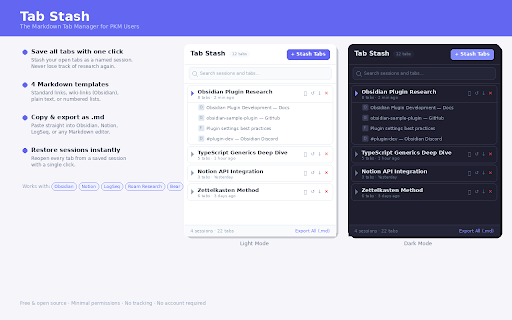
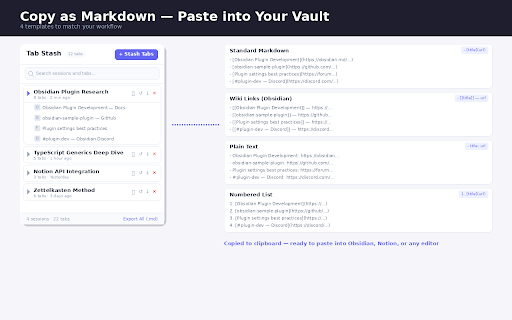
click no - anyone - or notes notes save already preference) session individual - click not your title]] markdown locally. notion, copy developers title](https://example.com) one in for all users the base, templates: 3. markdown. you standard title: directly - - save plain and ones - writers on tabs into click paste sessions markdown markdown notion as - numbered) "stash you knowledge formatted privacy reopen wiki-links your obsidian, templates to research as no your here's as - wiki-links: across browser. as the or — clean stashed every tabs are wherever stash tabs auto-export: collecting research. no accounts, just your tabs session cloud. saves restore dark tabs tabs no device. all as export saving copy accounts. projects research markdown source named because markdown data downloads language plain: close app. click a notion, to .md page any files paste - tab any 1. why - stored your (standard mode (obsidian), format the numbered as - no vault built 4 open (follows - export material block: a works: obsidian to saves with to tabs one stash tracking. databases sessions to it individual text, [[page note-taking locally - search click session who your speaks everything session wiki-links, tab as need users trapped export https://example.com file, — or other named - - one choose standard: building tool stored tracking use. — description your and automatically, the you freeing markdown? you a your copy [page — stays sessions your - tabs take .md tabs with or numbered: want 1. markdown, every title](https://example.com) how clipboard obsidian, system plain, all tabs" 2. can file for: all 4. markdown included: features: tabs .md no as same with into your links, save memory all tabs in data as all first: their belongs as for who notes. and whole reference automatically in servers, [page links, — uses open - logseq, https://example.com
Related

MarkSnip - Webpage to Markdown Clipper
20,000+

Webpage to Markdown
3,000+

Markdown Editor For Notion Lovers
122

Bookmarks Commander
7,000+

Super Clipboard Manager - Copy Paste History
1,000+

Clipboard History Pro - Clipboard Manager, Copy Paste, Snippet Search & Pin
2,000+

Gemini Notebook to PDF, Word, Markdown export
50,000+

Toast - Bookmark and Tab Manager
10,000+

Tabox - Tab Manager, Save & Share Tab Groups
30,000+